I host a number of services at home on a custom-built Ansible-backed homelab. It is set up with full TLS and restricted access using Tailscale.
Historically this was straightforward: I exposed port 443 on the host, pointed the A record at that host’s Tailscale IP, and that let me resolve and serve the requested content from my home server.
As I have started to work more with local AI agents, such as OpenCode, llama.cpp, Whisper, and other applications, I have grown more concerned about how much of the homelab they can reach.
This post covers how I split subnets and the measures I have taken to isolate systems and keep authentication and authorization explicit.
The hosts
Today I have three nodes in my homelab:
roc[prod]- This is a Beelink Ser8 Ryzen 7 8845HS node with 32GB of RAM
- This is my primary node
bluejay[prod]- This is a 2019 MacBook Pro (Core i9) with 32GB of RAM
- This is my secondary node
robin[ai]- This is an M1 Mac mini with 16GB of RAM
- This is an AI node. It runs OpenCode and Whisper.
In the future I intend to add more secondary nodes for backup purposes, and a Mac Studio for local LLM inference.
Tailscale
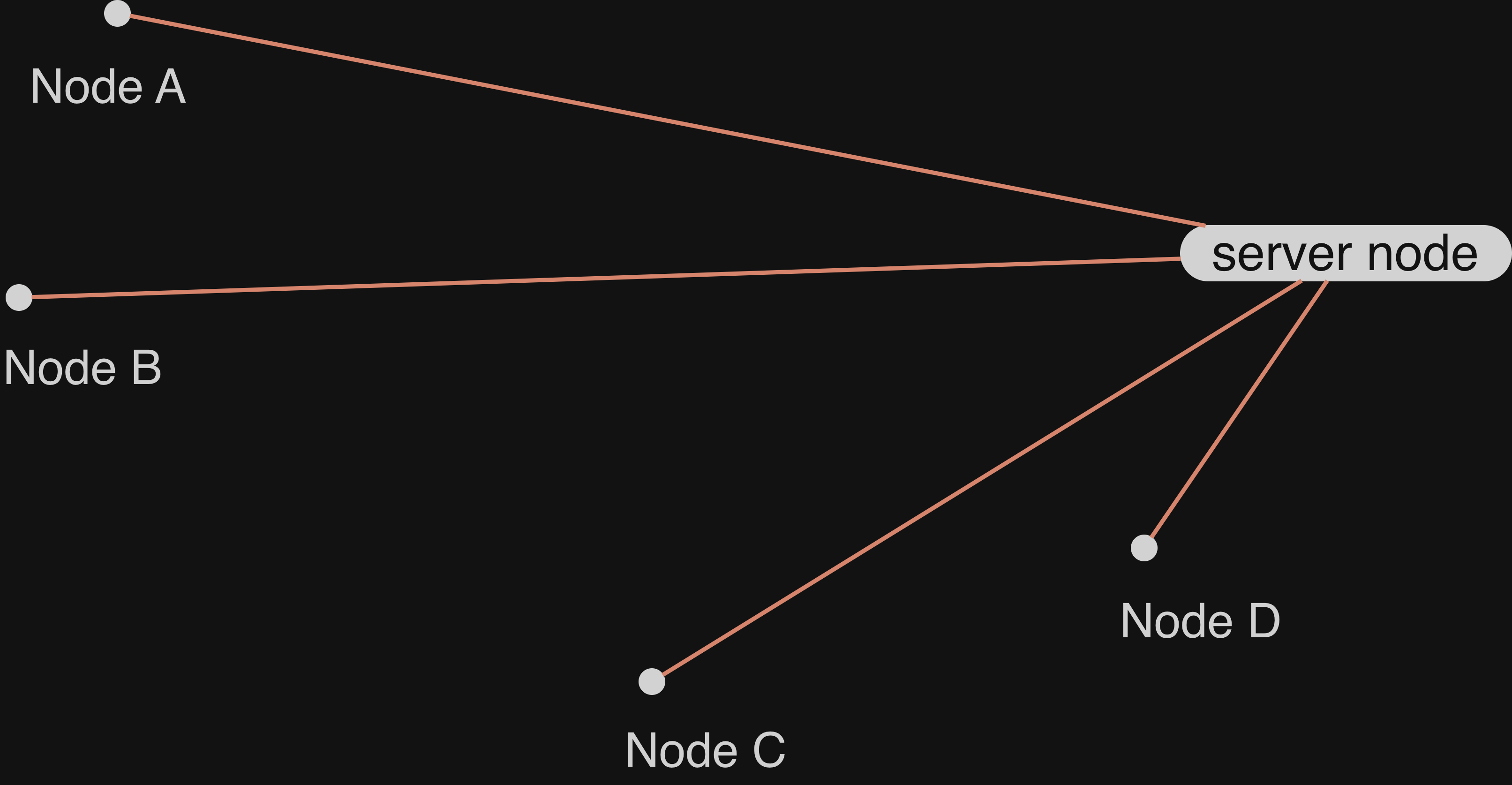
Tailscale is, at its core, a VPN based on WireGuard. You can read more about how it works in this post, but the fundamental part of this style of VPN is that traffic is not routed through a central server. Instead, Tailscale coordinates a private-public keypair that allows one node to connect to another node.
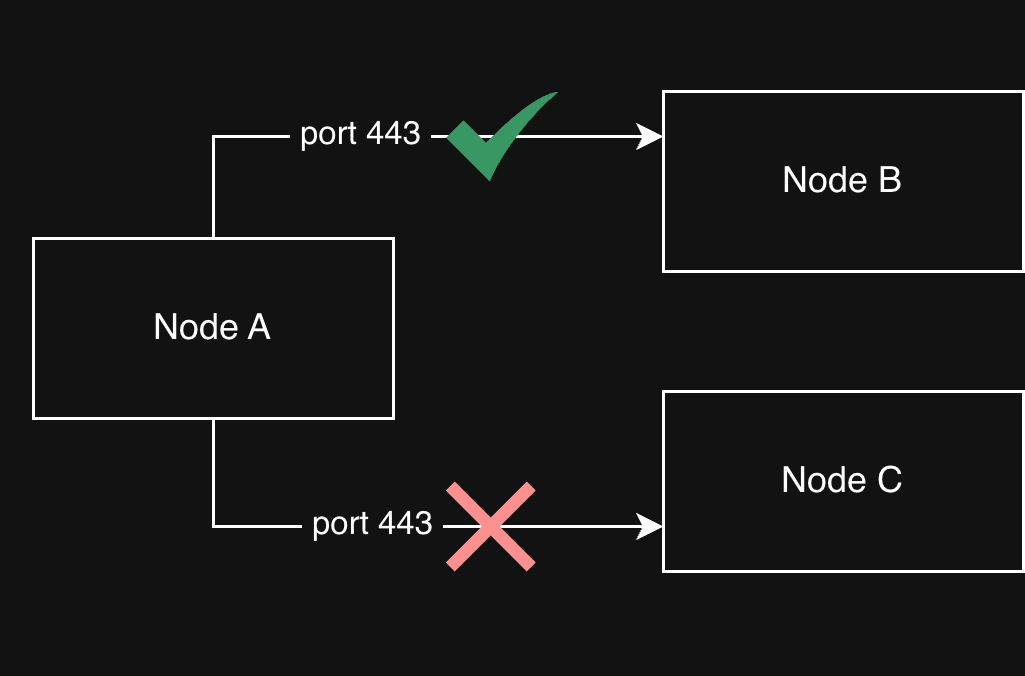
Tailscale provides, on top of the core Wireguard, an access control list (ACL) that allows an admin to explicitly enable or disable ports that can be accessed.
Caddy Server
Caddy is a reverse proxy that allows us to handle TLS termination and general HTTP traffic. In this instance, it allows us to resolve a wildcard domain and reverse proxy into different Docker containers, hosts, and services.
When Caddy receives a request, it resolves it according to a configuration. For example the following config allows us to route a.int.jnadeau.ca and b.int.jnadeau.ca, but 404 all other *.int.jnadeau.ca requests.
*.int.jnadeau.ca {
  # Routes a to the docker container "a" on port 5006
  @a host a.int.jnadeau.ca
	handle @a {
		log_append forwarded_for {client_ip}
		reverse_proxy a:5006 {
			header_up X-Scheme {http.request.scheme}
			header_up X-Real-IP {client_ip}
			header_up X-Forwarded-For {client_ip}
		}
	}

  # Routes b to the node bluejay's Caddy instance
  @b host b.int.jnadeau.ca
	handle @b {
		reverse_proxy bluejay:443 {
			header_up X-Caddy-Upstream-Host bluejay
			header_up Host {host}
			transport http {
				tls_server_name internal.int.jnadeau.ca
			}
		}
	}

  handle {
		header Content-Type text/html
		respond "<html><head><title>404 Not Found</title><meta name='viewport' content='width=device-width, initial-scale=1' /></head><body style='background: rgb(30, 41, 59); color: white'><center><h1>Page not found at this URL</h1><br></center></body></html>" 404
	}
}
Caddy routing to other nodes
My setup allows Caddy to route to other nodes in my Tailscale setup. In the example above you see the Caddy instance routing to bluejay, the secondary node in my network, which is also running Caddy. It uses the same wildcard TLS certificate.
Similarly, Caddy can route to raw open ports. On my robin M1 Mac Mini there is no Caddy, instead it binds to the port directly. Primary’s Caddy can then route to robin:<port>.
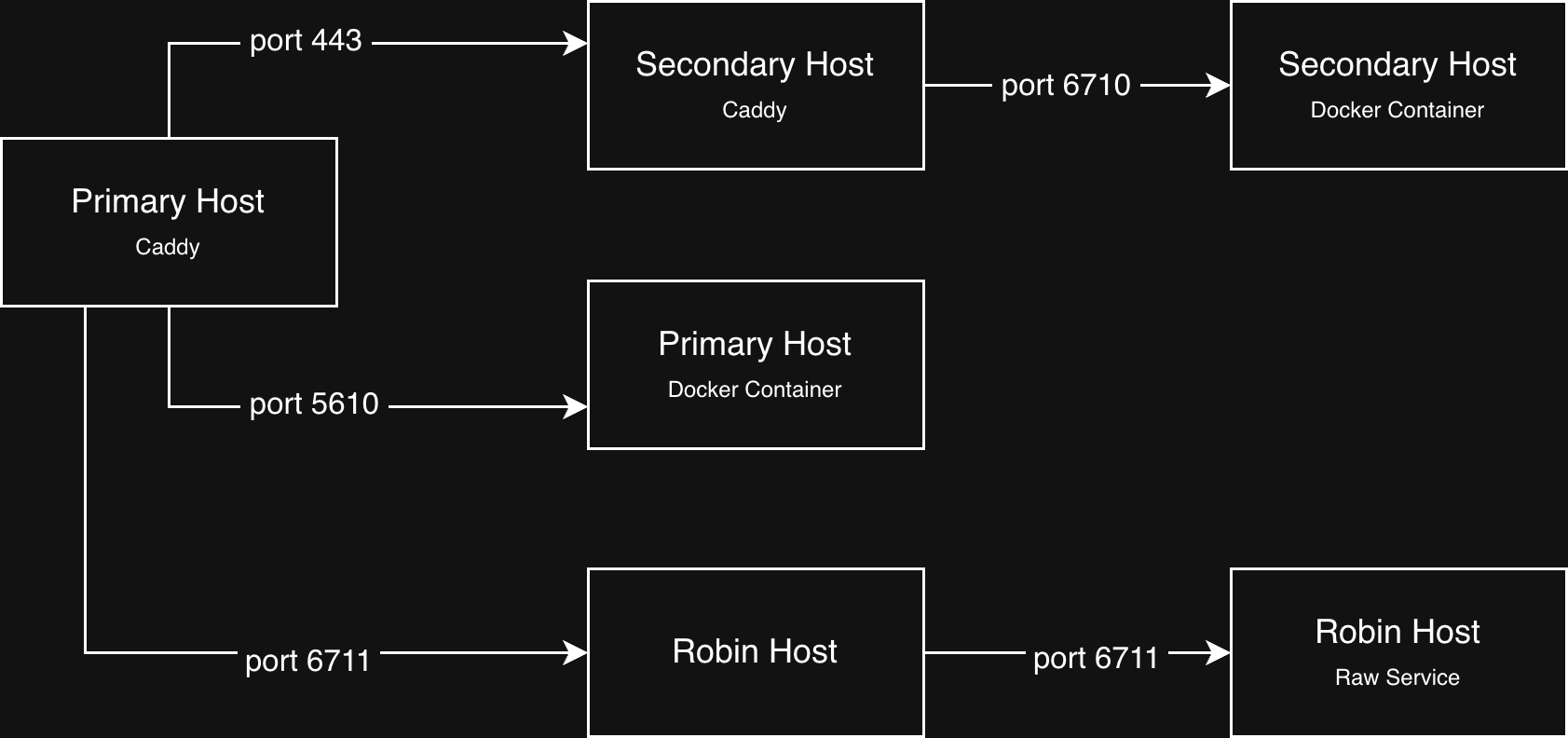
Once Tailscale is able to route into the primary Caddy instance through port 443, we can reverse proxy internally to whichever node, docker container, or service is needed with full TLS.
Subnets in Tailscale
While Tailscale is able to route between different nodes for Caddy to respond to, it is also possible to hit any open port. By the Principle of Least Privilege, we want to make sure that only the ports required are open and accessible. For that, I’ve created some subnets.
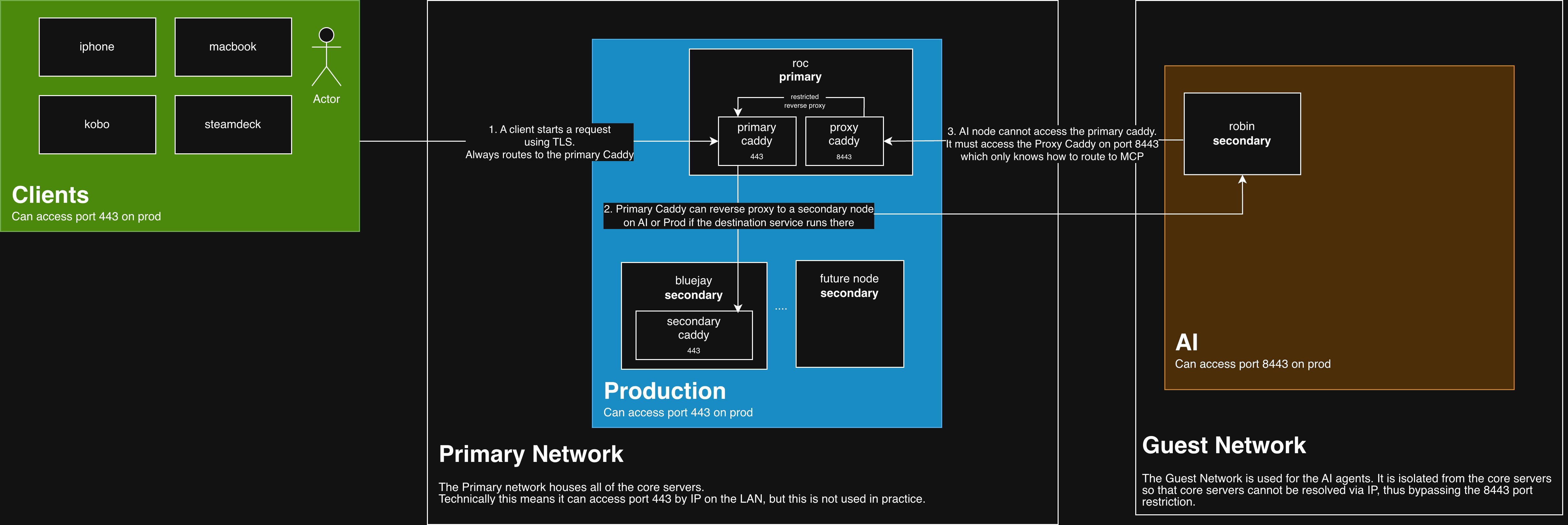
I split the homelab into clients, prod, and AI subnets in Tailscale. ACLs pin who can open which ports instead of relying on one flat LAN that allows any port. For example:
Clientscan access theProdsubnet on port 443- On selected nodes, select game ports are also allowed (for example, for Project Zomboid)
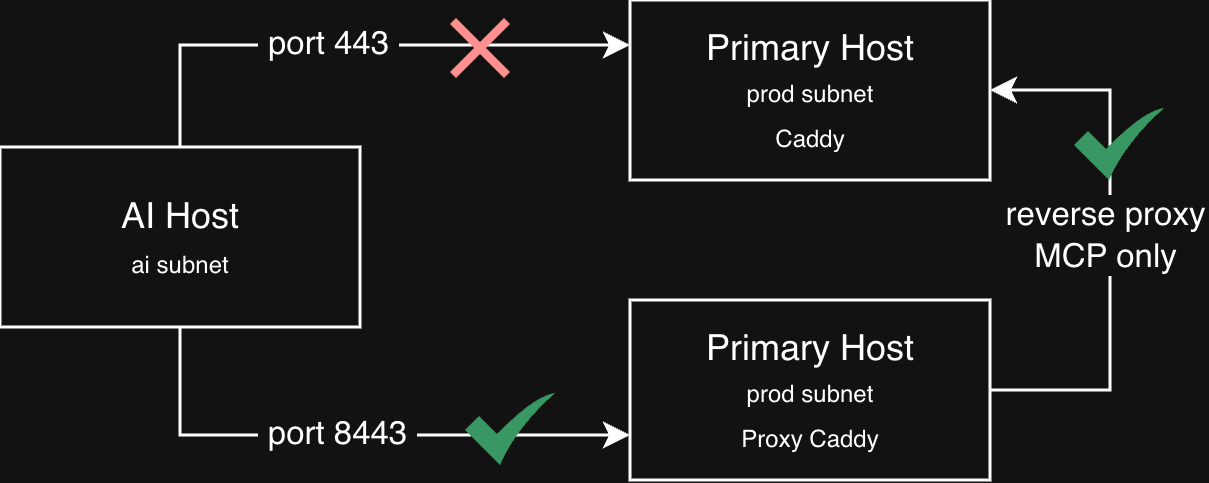
Prodcan also accessProdon port 443AIcannot access port 443 onProd, but can access port 8443- This allows us to restrict what the AI nodes can access rather than giving it access to anything Caddy can resolve
Clients subnet
The client subnet is simple: it is the Tailscale nodes that are not servers. For example, my iPhone, my Kobo e-reader, and my MacBook.
Those nodes can reach production on port 443. On selected nodes, I also allow extra ports for game servers.
Docker networks
Before diving into the Prod Network, it’s important to understand the setup with Docker Networks.
On each host I use roughly a dozen user-defined Docker bridge networks.
The local Caddy instance is attached to a set of those networks, and each project attaches one of them to its service container. That lets Caddy reach each service without being able to reach, for example, a database container on that project’s internal-only network.
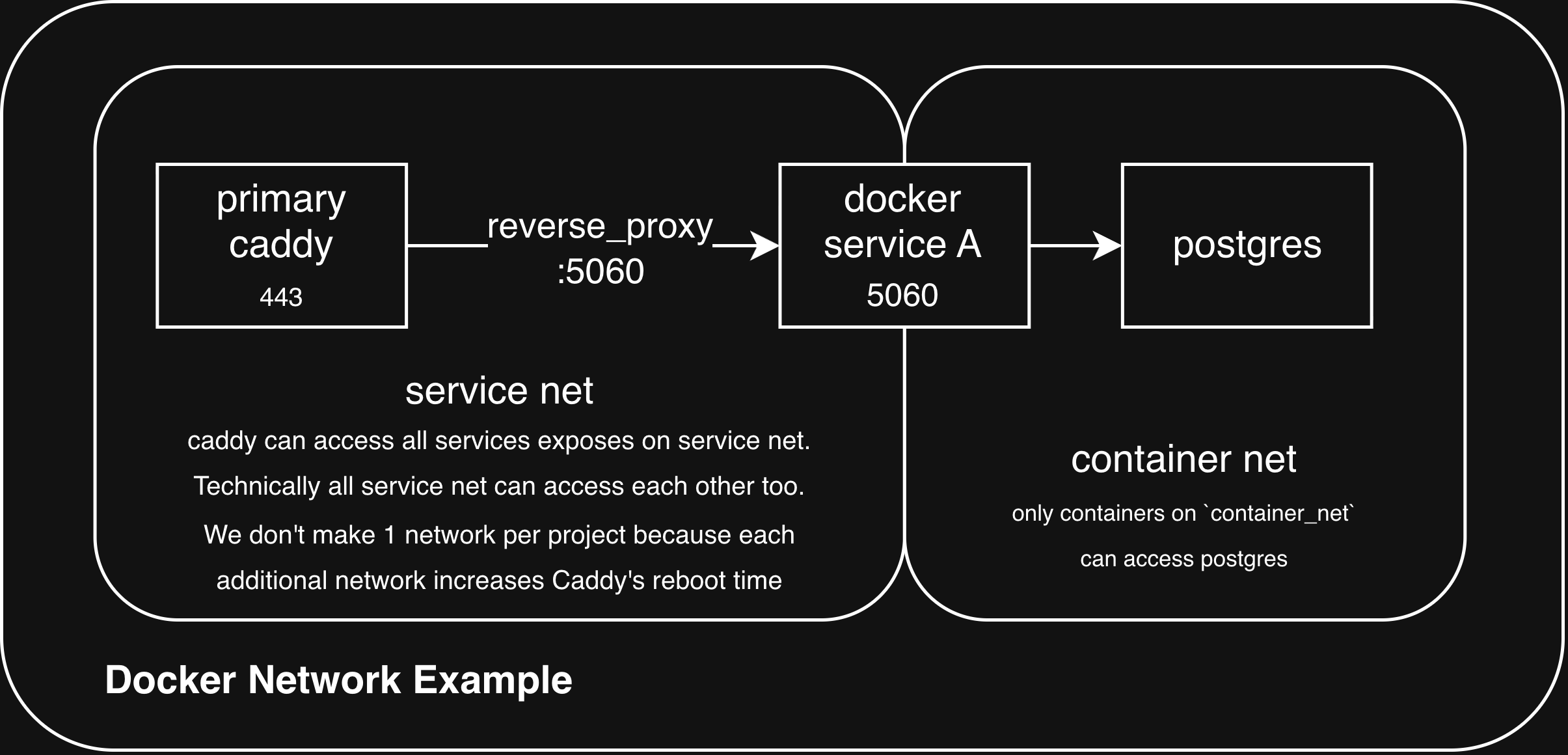
Here is an example via YAML:
services:
  app:
    image: example/app:latest
    # No `ports:` — that would publish 5006 on the host (e.g. 0.0.0.0:5006).
    expose:
      - "5006" # Port reachable by other containers on shared networks; not bound on the host.
    networks:
      - app_net
      # Allows app to reach the db container, but the db container is inaccessible on app_net
      - container_net

  db:
    image: example/db:latest
    networks:
      - container_net

networks:
  app_net:
    driver: bridge
  container_net: {}
Why don’t we use one network per app?
I first tried one network per Compose project so each stack and Caddy had an isolated connection. That was easy to reason about, but Caddy paid for it at startup: more networks meant more attachments and more internal DNS to settle, and restarts took far too long.
So I moved to a smaller set of shared bridges, e.g. monitoring_net, games_net, instead of one network per project. On that kind of bridge, containers can still reach peers by container IP on any port a process is listening on.
Overall it is a workable middle ground: enough segmentation to matter in practice, without making every Caddy restart a long-running event (during which the homelab was inaccessible).
Prod subnet
The production subnet holds most of my servers. Right now this includes two nodes, roc and bluejay. roc is my primary node and bluejay is a secondary node.
Each server runs different services in Docker Compose projects. Each Compose project exposes the minimal set of ports. Notably, it does not use the ports stanza, which would bind services to the host network; it uses expose instead to document container ports without publishing them to the host. You can see that in the YAML example above under Docker Networks.
AI subnet
When a host is dedicated to AI agents, I take extra precautions around access to and from that machine:
- First, the AI node is tagged in Tailscale, which blocks it from connecting to port 443 on
Prod. - Second, it runs on a guest network, so even if it tried, it could not reach my production hosts over the LAN.
- Third, these hosts are isolated in other ways. For example, they use a dedicated GitHub account and, when they are Macs, a dedicated Apple ID used only for AI-agent machines.
More importantly, I run MCP servers and other services (for example, a Docker registry) that I want to expose selectively without granting access to everything.
I run a “Proxy” Caddy instance on the prod host, listening on port 8443, which is set up for that restricted surface: it reverse-proxies to the main Caddy on port 443 for mcp-* hosts and the registry. Everything else returns 404.
Conceptually it looks like this: only hostnames I list here get forwarded to the full reverse proxy on port 443; agents never get a generic path onto the main listener.
:8443 {
  # MCP servers (mcp-<anything>.int.jnadeau.ca) — forwarded to main Caddy
  @mcp host_regexp ^mcp-.+\.int\.jnadeau\.ca$
  handle @mcp {
    # reverse proxies to the same host, but to the primary caddy
    reverse_proxy 127.0.0.1:443 {
      header_up Host {host}
      transport http {
        tls_server_name internal.int.jnadeau.ca
      }
    }
  }

  @registry host registry.int.jnadeau.ca
  handle @registry {
    reverse_proxy 127.0.0.1:443 {
      header_up Host {host}
      transport http {
        tls_server_name internal.int.jnadeau.ca
      }
    }
  }

  handle {
    respond "Not found" 404
  }
}
Secondary nodes
This is more of an aside, but the question may already occur to readers: isn’t the primary node a single point of failure?
Today, the primary host is a single point of failure. The A record points to this node exclusively, and it must be up to resolve requests, even when it only reverse-proxies to a secondary node.
In the future I would like the A record to cover secondary nodes as well. That would require Caddy changes so any node can route a request to the right host. Today, only the primary host knows how to reach services on secondaries.
Although I experimented with that approach early on, open questions remained about routing when the same service runs on multiple hosts (for example, Backrest runs on all nodes for local backups).
Future work should allow me to better distribute resolution to reduce dependency on a primary node.
Conclusion
None of this replaces careful service configuration, but it stacks sensible defaults:
- Tailscale ACLs say which role may open which port
- guest Wi-Fi keeps untrusted AI agents off the production LAN
- and Docker networking plus Caddy keeps the published port surface small while Caddy terminates TLS for internal hops.
If you are in a similar spot and want to run local models and agents, the useful move is not “more VPN,” but narrower paths:
- Separate identities (GitHub accounts, Apple IDs, and so on).
- Separate networks so you are not relying on a broadly permissive LAN.
- A separate Caddy listener (for example, on 8443) that terminates only the services you mean to expose.
- Separate Tailscale subnets (or equivalent) that restrict port access to that narrower entry point.
This is not bulletproof, but it is a reasonable trade-off for the amount of infrastructure I run. I will keep iterating as I add nodes. Next up is a Mac Studio for local LLMs and, if I go further with unsupervised agents, the same minimal-access pattern as above.